label-studio导入标注

label-studio导入标注
Chase Woolabel studio导入标注
通过一个json文件,在label studio当中同时导入本地样本和标注
关键字:label-studio 标注
我在使用label studio标注的时候,需要修改一些已经标注好的样本,这就需要从本地导入带标注的样本。我使用的是 label-studio==1.21.0。
一、从json导入样本和标注
- 首先需要添加环境变量
1 | # linux |
理论上也可以用http,但我没试
- 首先创建一个项目,data import不用管, labeling setup选择你的任务
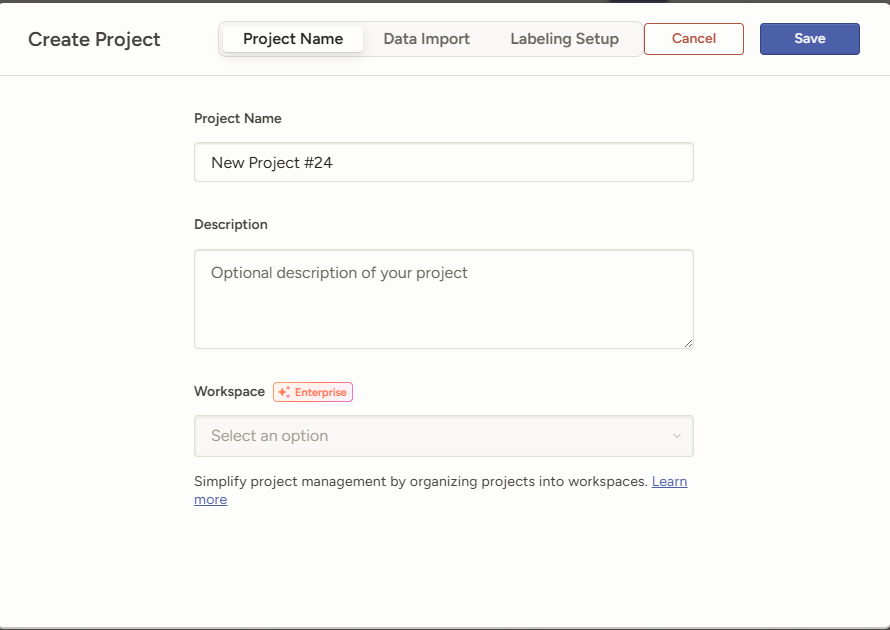
- 从source storage导入
点开项目的settings,选择cloud storage,再选择add source storage
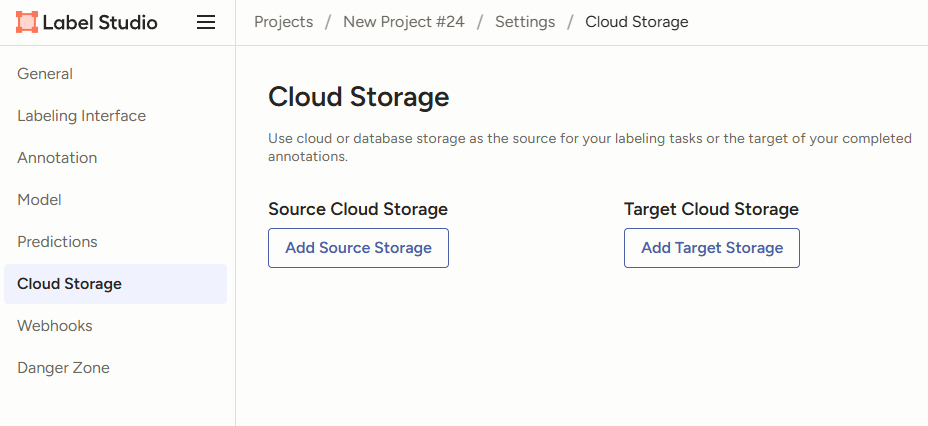
选择local files
连接到你的数据集地址,注意Absolute local path必须是LABEL_STUDIO_LOCAL_FILES_DOCUMENT_ROOT的子目录
然后preview loaded标注文件,这个文件我会在下面说明
最后save & sync就行
二、获取json文件
因为我是要训练yolo目标检测,使用的是txt标注,但是label studio必须从json导入。并且yolo标注是中心百分比,json标注是左上坐标,所以还需要使用脚本做一次转换,注意你的数据集结构。需要安装依赖pip install Pillow
这个脚本会生成一个json文件,将每个标注都和每个图片一一对应起来,不得修改IMAGE_URL_PREFIX,这是一个固定值。
yolo2json.py
1
2
3
4
5
6
7
8
9
10
11
12
13
14
15
16
17
18
19
20
21
22
23
24
25
26
27
28
29
30
31
32
33
34
35
36
37
38
39
40
41
42
43
44
45
46
47
48
49
50
51
52
53
54
55
56
57
58
59
60
61
62
63
64
65
66
67
68
69
70
71
72
73
74
75
76
77
78
79
80
81
82
83
84
85
86
87
88
89
90
91
92
93
94
95
96
97
98
99
100
101
102
103
104
105
106
107
108
109
110
111
112
113
114
115
116
117
118
119
120
121
122
123
124
125
126
127
128
129
130
131
132
133
134
135
136
137
138
139
140
141
142
143
144
145
146
147
148
149
150
151import json
import os
from PIL import Image
# -------------------------------------------
# 将yolo格式的标注文件转换为一个json格式的标注文件,用于导入到Label Studio中
# -------------------------------------------
# 1. 图片目录和标注目录 (支持分离的目录结构)
# 图片目录
IMAGES_DIR = 'customv8/images'
# 标注目录 (txt文件)
LABELS_DIR = 'customv8/labels'
# 2. Label Studio 图片URL配置
# Label Studio 本地文件前缀
IMAGE_URL_PREFIX = "/data/local-files/?d="
# 图片在服务器上的实际挂载绝对路径
IMAGE_MOUNT_PATH = "customv9/images"
# 3. 你的类别映射 (根据你提供的列表已填好)
LABEL_MAP = {
0: "person",
1: "bottle",
2: "cell phone",
3: "pen",
4: "smoke",
5: "bottle cap",
6: "clip",
7: "lighter",
8: "key",
9: "cigarette box"
}
# 4. 输出文件名
OUTPUT_FILE = 'import_to_ls.json'
def yolo_to_ls_bbox(x_center, y_center, w, h):
"""YOLO (归一化中心点) -> Label Studio (百分比左上角)"""
x_ls = (x_center - w / 2.0) * 100
y_ls = (y_center - h / 2.0) * 100
w_ls = w * 100
h_ls = h * 100
return x_ls, y_ls, w_ls, h_ls
def convert():
ls_tasks = []
if not os.path.exists(IMAGES_DIR):
print(f"错误: 找不到图片路径 {IMAGES_DIR}")
return
if not os.path.exists(LABELS_DIR):
print(f"错误: 找不到标注路径 {LABELS_DIR}")
return
# 递归搜索所有图片文件
image_extensions = ('.png', '.jpg', '.jpeg', '.bmp', '.webp')
image_paths = []
for root, dirs, files in os.walk(IMAGES_DIR):
for f in files:
if f.lower().endswith(image_extensions):
image_paths.append(os.path.join(root, f))
print(f"找到 {len(image_paths)} 张图片,开始处理...")
for img_path in image_paths:
img_file = os.path.basename(img_path)
base_name = os.path.splitext(img_file)[0]
# 获取图片相对于 IMAGES_DIR 的相对路径,用于找到对应的标注文件
rel_path = os.path.relpath(img_path, IMAGES_DIR)
rel_dir = os.path.dirname(rel_path)
# 在 LABELS_DIR 对应的子目录下查找 txt 文件
txt_file = os.path.join(LABELS_DIR, rel_dir, base_name + '.txt')
# 构建完整的图片URL路径: IMAGE_URL_PREFIX + IMAGE_MOUNT_PATH + / + 相对路径
image_url = f"{IMAGE_URL_PREFIX}{IMAGE_MOUNT_PATH}/{rel_path}"
task = {
"id": base_name,
"data": {
"image": image_url
},
"annotations": [
{
"result": []
}
]
}
# 获取图片实际像素尺寸 (用于精确转换)
try:
with Image.open(img_path) as im:
img_w, img_h = im.size
except Exception as e:
print(f"警告: 无法读取图片 {img_file}, 跳过。错误: {e}")
continue
# 读取对应的 txt 标注
if os.path.exists(txt_file):
with open(txt_file, 'r') as f:
lines = f.readlines()
for line in lines:
parts = line.strip().split()
if len(parts) < 5: continue
try:
class_id = int(parts[0])
x_c, y_c, w, h = map(float, parts[1:5])
# 坐标转换
x, y, width, height = yolo_to_ls_bbox(x_c, y_c, w, h)
label_name = LABEL_MAP.get(class_id)
if not label_name:
print(f"警告: 图片 {img_file} 包含未知的类别ID {class_id}")
continue
# 生成 Label Studio 标注对象
item = {
"original_width": img_w,
"original_height": img_h,
"image_rotation": 0,
"value": {
"x": x,
"y": y,
"width": width,
"height": height,
"rotation": 0,
"rectanglelabels": [label_name]
},
"id": f"{base_name}_{len(task['annotations'][0]['result'])}", # 生成临时ID
"from_name": "label",
"to_name": "image",
"type": "rectanglelabels"
}
task["annotations"][0]["result"].append(item)
except ValueError:
continue
ls_tasks.append(task)
# 写入 JSON 文件
with open(OUTPUT_FILE, 'w', encoding='utf-8') as f:
json.dump(ls_tasks, f, indent=2, ensure_ascii=False)
print(f"成功! 已生成 {OUTPUT_FILE},包含 {len(ls_tasks)} 个任务。")
print("下一步:请在 Label Studio 导入此 JSON 文件。")
if __name__ == '__main__':
convert()
脚本生成的json元素是这样的
三、最后
label studio会根据json中的地址找到图片,并与标注对应。这样就实现了仅通过一个json标注文件,将本地图片和标注同时导入到label studio中。